
How to Build a Design System With Claude Code
Your WordPress theme was enforcing design consistency invisibly. When you migrate to a custom Claude Code build, that disappears. Here is how to replace it with four files.
Read articleYou built it with Claude Code. The site works. But search engines cannot see it. Here is the full SEO playbook - at three levels of depth.

Launch day felt like a win.
You built the product. Claude Code handled the code. The site looks exactly how you imagined it.
Then you checked the traffic. Nothing.
Not slow growth. Zero. No visitors from search. Not after one week. Not after one month.
This is the most common outcome for vibe-coded projects. The code works. The design is clean. But search engines cannot read it, rank it, or send anyone to it.
You described what to build. Claude Code built it. Everything search engines need - the signals, the structure, the metadata - was left out. Not by mistake. Because nobody asked for it.
This guide covers what is missing. It walks through what good SEO actually takes, then shows how Claude Code handles all of it at three levels of depth.
These are the specific problems that appear on vibe-coded sites.
1. Invisible: Search is the highest-intent traffic that exists. Someone searching “project management for small teams” is ready to buy. If your site does not appear, that person goes to a competitor. They never know you exist.
2. Costly: Without organic traffic, every visitor comes from ads or outreach. You pay per click. SEO is the only channel where the cost per visitor goes down over time, not up.
3. Bare: When you describe a project to Claude Code, you describe the product. You do not describe the metadata. The result: no title tags, no meta descriptions, no alt text on images, no structured data. All invisible to search engines.
4. Unread: React and SvelteKit apps built with AI often render content client-side. Google can read JavaScript, but slowly and partially. Pages rendered in JavaScript frequently get missed or indexed without their content.
5. Slow: Claude Code does not optimize images unless you ask. No WebP. No compression. The result is large images and slow load times. Google confirmed page speed as a ranking factor. This is where most vibe-coded projects fail quietly.
6. Isolated: Pages do not link to each other. Google cannot understand which pages matter most. Authority never accumulates. Pages that should rank on page one stay buried on page ten.
7. Duplicate: AI-generated projects often create similar pages - product variants, tag pages, search result pages. Without canonical tags, Google treats each as a duplicate. It penalizes or ignores them.
8. Blind: Without Search Console and analytics, you cannot see what is working. No keyword data. No click data. No crawl errors. You build and publish without knowing if anything lands.
Before Claude Code, ranking a site meant working through every layer manually.
You need to know what people actually search for before you write a word.
FREE RESEARCH TOOLS
A serious keyword research session takes 4-8 hours. You need keywords with real volume, manageable competition, and clear match to what you sell.
Writing the content is not enough. Every page needs a complete technical layer:
<title> tag - under 60 characters, primary keyword first<h1> that matches the page search intent<h2> for sections, <h3> for subsectionsalt text on every imageMost marketers get the writing right and skip the technical layer. Search engines weight both equally.
Structured data tells Google what a page contains. It is what creates FAQ dropdowns, star ratings, and event listings in search results.
After writing the JSON-LD, you need to validate it before it counts.
VALIDATION TOOLS
Adding schema to 20 pages manually takes a full day. One syntax error breaks the entire block silently.
Slow pages rank lower and lose users before they convert.
PERFORMANCE TOOLS
This is where vibe-coded projects fail hardest. Uncompressed PNG images, unused CSS, render-blocking scripts. Every fix requires reading the build output and applying targeted changes.
The Website PageSpeed Template covers this workflow end to end - from running the audit to verifying each fix.
You cannot rank pages that are not indexed. You cannot fix errors you cannot see.
INDEXING AND SEARCH TOOLS
Submit your sitemap here after every major deploy. Check coverage errors weekly.
Once traffic starts, you need to track it.
ANALYTICS TOOLS
Done manually, this workflow takes a specialist several days per site. Every new page, every update, every structural change requires running the same checklist again.
This is exactly what Claude Code solves - not by skipping the work, but by doing all of it in the same session you build the page.Claude Code reads your website the way a developer does. It accesses every file. It checks every signal. And it writes the fix in the same session it finds the problem.
Traditional SEO tools give you a report. Claude Code gives you closed tickets.
Here is how to apply this at three levels.
If you are just starting, run these three prompts in one session at the root of your project. They produce the most SEO value with the least effort.
Fix 1 - Full Technical Audit
“Read every HTML file in this project. Check every page for: missing or empty title tags, missing meta descriptions, pages blocked by noindex, incorrect canonical tags, and broken internal links. Return a numbered list with the exact fix for each issue.”
One prompt. A prioritized list with patches ready to apply.
A technical audit that used to take a developer two hours takes Claude Code about fifteen minutes.Fix 2 - Meta Description Sweep
“Read every page in this project. List every page missing a meta description or with one over 155 characters. Write a replacement for each one - under 155 characters, starting with the most relevant phrase for that page.”
Meta descriptions appear directly in search results. A clear description is the difference between a click and a scroll-past.
Fix 3 - Schema Markup
“For each page in this project, identify the most relevant schema type: Article, FAQ, Product, LocalBusiness, or WebPage. Write the correct JSON-LD block for each and insert it into the HTML head.”
Schema creates rich results. FAQ schema adds dropdown answers below your listing. Product schema shows price and availability. Both increase click rate at the same ranking position.
Once the basics are solid, go deeper.
Internal Linking
“Read every page in this project. Identify the 10 best internal linking opportunities - pages that cover topics found on other pages but do not link to them. Generate the anchor text and target URL for each. Add every link to the relevant page.”
One session of internal linking can significantly improve how Google reads your site structure.
Image Optimization
“Find every image in this project. Convert all PNG and JPG files to WebP, compress each to under 200KB, update every HTML reference to point to the WebP file, and add descriptive alt text to every image tag that is missing it.”
This single fix often moves PageSpeed scores by 20 to 40 points.
Sitemap and Robots.txt
“Check this project for sitemap.xml and robots.txt. If either is missing, generate the correct file. The sitemap should list every public page. The robots.txt should allow all crawlers and reference the sitemap location.”
Submit the sitemap to Google Search Console and Bing Webmaster Tools immediately after.
Content Optimization
“Read the content on [page]. The target keyword is [keyword]. Does it appear in the title tag, the first 100 words, at least two headings, and the meta description? Are related terms used naturally? List specific edits that strengthen the keyword signal without stuffing.”
The highest level is making SEO automatic. Not a one-time fix. A standard every new page meets before it ships.
This is done with Claude Code skills and hooks.
A skill is a reusable instruction set you call with a / command. You write it once and use it on every project.
For SEO, you might build:
USEFUL SEO SKILLS
/seo-audit - full technical audit of the entire project on demand/seo-new-page - mini-audit that runs every time you create a new page/seo-images - finds and optimizes every unoptimized image in one pass/seo-content [keyword] - checks any page against a target keywordDaniel Agrici maintains a collection of ready-made Claude Code SEO skills at claude-seo.md. The skills are well-built and worth reviewing. Use the collection as a starting point - but do not add all of them. Read through it and copy only the skills your project actually uses. An unused skill adds noise to your CLAUDE.md and slows context loading.
Security note: Always have Claude Code review any skill you copy from an external source before adding it to your project. Ask it to flag any instruction that modifies files outside the project directory, makes external network requests, or runs system commands. This review takes two minutes. It protects you from behavior the original author did not intend for your setup.
Hooks fire automatically when specific events happen. For SEO, the most useful patterns:
.md or .html files - runs a mini SEO check every time a new page is createdWith hooks in place, every page that ships has correct metadata. Every new image is WebP. Nothing goes live with a missing title tag or a broken canonical.
A hook-based SEO system turns a once-per-sprint task into a background process you stop thinking about.The full setup - keyword research prompts, technical audit checklist, schema templates, the complete prompt library, and ready-made skill and hook configurations - is packaged into a free download.
Drop it into your project. Run the setup once. Claude Code will handle SEO as part of its standard workflow from that point forward.
Get the Claude Code SEO Template and add SEO to your project today.
One week free. If you want to try Claude Code before you commit, Anthropic offers a free week through referral. Start your free week here - no payment needed to begin.
This is part of the Build System - the layer that takes Claude from setup to specific, measurable results on your site.
May you build Greatness! 🍀
Michael
The complete Claude Code SEO system - CLAUDE.md config, 8 prompts, pre-publish checklist, schema templates, and 4 ready-made skills. Set up in 15 minutes.
Your WordPress theme was enforcing design consistency invisibly. When you migrate to a custom Claude Code build, that disappears. Here is how to replace it with four files.
Read article
Claude Code is not a developer tool. It is the tool that builds the marketing automations you keep describing in chat. No developer needed.
Read article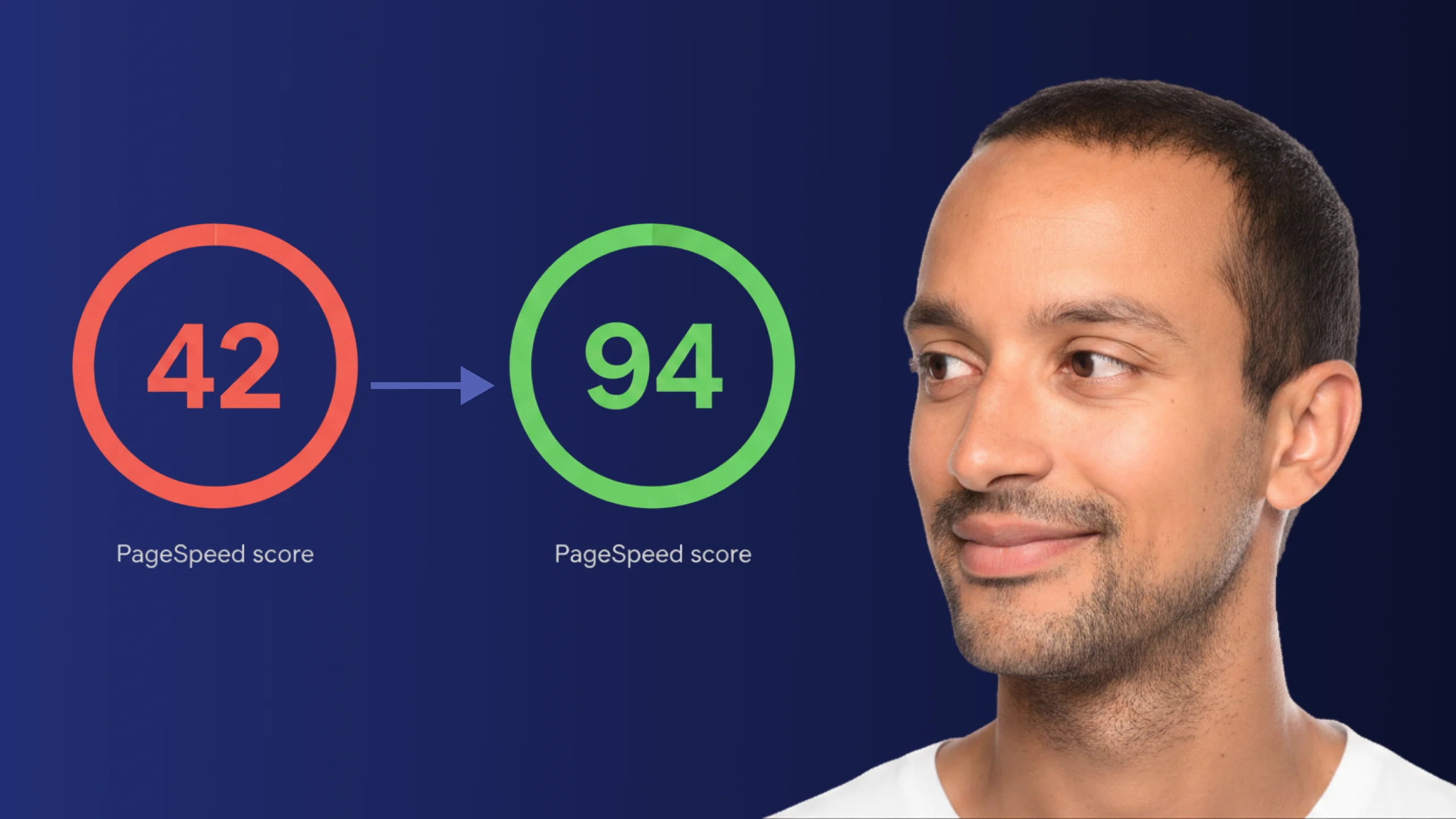
A PageSpeed score of 42 is not just slow - it is losing you real traffic on every visit. Here is exactly how Claude Code diagnosed and fixed the performance issues that moved this site from 42 to 94.
Read article