How to Build a Design System With Claude Code
Your WordPress theme was enforcing design consistency invisibly. When you migrate to a custom Claude Code build, that disappears. Here is how to replace it with four files.
Read articleClaude Code is not a developer tool. It is an AI agent that builds for you. You describe what you want, and it writes and runs the code.

You have heard about Claude Code.
Maybe you looked it up. Maybe a developer mentioned it. Maybe you saw someone build something impressive in ten minutes.
Then you opened the terminal and it felt like it was not for you.
It is.
Claude Code is not a developer tool. It is an AI agent that builds for you. You describe what you want. It writes the code. It runs it. It checks that it works.
You do not write a single line.
This guide shows you what Claude Code actually is, what you need to use it, and how to get real output in your first session.
Claude Code is an AI agent. It runs in your terminal. You describe what you want. Claude Code writes the code. It runs the code. It checks that it works. You do not write code. You give instructions.
That is the key difference. You are not learning to code. You are learning to give clear instructions. That is a communication skill. Not a technical one.
What to know before you start:
Most people start with Claude.ai. It is useful. You can draft, summarize, and think things through. But it cannot touch your files. It cannot run code. Everything stays in the chat.
Claude Code is different. It runs inside your project. It reads your files. It writes your files. It runs the code it produces. You are not copying from a chat. You are watching a build happen on your machine.
The Agent Power Level (APL) framework explains this well. APL1 is browser chat - Claude.ai. APL3 is codebase-wide work - Claude Code. Same model. Different setup. Different results.
The honest answer: more than you expect, less than you can imagine on day one.
In your first few sessions, here is what you can build:
Websites and landing pages - describe the layout and copy; Claude Code builds it; you refine until it matches
Internal tools - a form that saves data to a spreadsheet; a dashboard that shows your numbers; a report that runs on demand
Automation scripts - rename files in bulk; send a formatted email from a CSV; process a list of URLs
Simple web apps - a login page, a database, a set of screens people can interact with
You do not need to read the code. You need to know what you want. The clearer your instructions, the better the first result.
Getting Claude Code running takes less than an hour.
1. Install Node.js
Claude Code needs Node.js to run. Go to nodejs.org. Download the LTS version. Install it. Takes a few minutes.
2. Create an Anthropic account
Go to anthropic.com. Create an account. Add a payment method to get an API key. Most beginner sessions cost under one dollar.
3. Install Claude Code
Open your terminal. On Mac: Terminal. On Windows: Command Prompt or PowerShell. Run:
npm install -g @anthropic-ai/claude-codeWhen it finishes, run claude --version to confirm it worked.
4. Connect your account
Run claude in your terminal. It will ask for your API key. Paste it in. You are connected.
5. Start your first session
Go to your project folder. Run claude. A prompt appears. Describe what you want.
Be specific. Not “build me a website.” Instead: “Build a single-page website. Dark navy background. White text. A headline at the top. Three feature cards in a row. A contact form at the bottom.”
One week free. If you want to try Claude Code before you commit, Anthropic offers a free week through referral. Start your free week here - no payment needed to begin.
Session one goes well. You build something. You close the terminal.
Session two starts. Claude Code has no idea what you built. It does not know your project. It does not know your decisions. You explain everything again. It takes twice as long.
That is what happens without a CLAUDE.md file.
CLAUDE.md is a plain text file in your project folder. It tells Claude Code what the project is. It tells Claude Code your rules. With it, every session picks up where the last one ended.
The AOL framework calls this the step from AOL1 to AOL2. AOL1: no memory, no context. AOL2: CLAUDE.md in place. That one file is the single biggest improvement you can make. Output gets better. Output gets consistent.
A simple CLAUDE.md looks like this:
# Project Name

## What this is
[One sentence about the project]

## Stack
[What tools Claude Code is using]

## Rules
- [Things Claude Code should always do]
- [Things Claude Code should never break]
Fill it in after your first session. Once you know what Claude Code chose to use.
You open Claude Code. You type something. The output is not quite right.
So you type more. You correct it. You correct the correction. After ten rounds, nothing feels stable.
That is not a Claude Code problem. That is a brief problem.
“Make my site look better” gives Claude Code nowhere to go. “Change the card border to 1px solid grey and add a soft shadow” gives it a target. The more specific you are, the faster you get what you want.
Claude Code is a builder. It does not guess. It executes.
Second thing: the first output is not the final output. That is not a failure. That is the process. Brief, review, revise. Three to five rounds is normal. If you stop after round one, you miss how fast it gets better.
Third thing: know when to start fresh. Sometimes a session breaks down. Too many corrections. Output gets inconsistent. When that happens - stop. Update your CLAUDE.md with what you learned. Start a new session. A clean brief always beats a messy one.
Can you use Claude Code without knowing how to code?
Yes. Claude Code writes the code. Your job is to describe what you want. Then review what it produces. Then tell it what to change. The skill is giving clear instructions. Not reading or writing code.
What does Claude Code cost?
No flat monthly fee. You pay per session through the Anthropic API. Most beginner sessions cost under one dollar. A Claude Max subscription includes Claude Code with higher limits. That makes sense once you use it every day.
How long does it take to learn?
You will get working output in your first session. The learning is about being more specific. By session three or four, you will move much faster.
What is the difference between Claude Code and Cursor?
Cursor is for developers writing code. Claude Code is an agent. You give it instructions. It builds. If you do not write code, Claude Code is the better starting point.
What can you build in your first session?
One focused thing. A working webpage. A simple script. A small data tool. Trying to build too much at once is the main reason first sessions feel slow.
This is part of the Build System. It takes you from first contact with Claude Code to real output. The Starter Guide gives you the setup that makes every session faster.
Next in this series: How to Use Claude Code Without Engineering Experience
May you build Greatness! 🍀
Michael
Your WordPress theme was enforcing design consistency invisibly. When you migrate to a custom Claude Code build, that disappears. Here is how to replace it with four files.
Read article
Claude Code is not a developer tool. It is the tool that builds the marketing automations you keep describing in chat. No developer needed.
Read article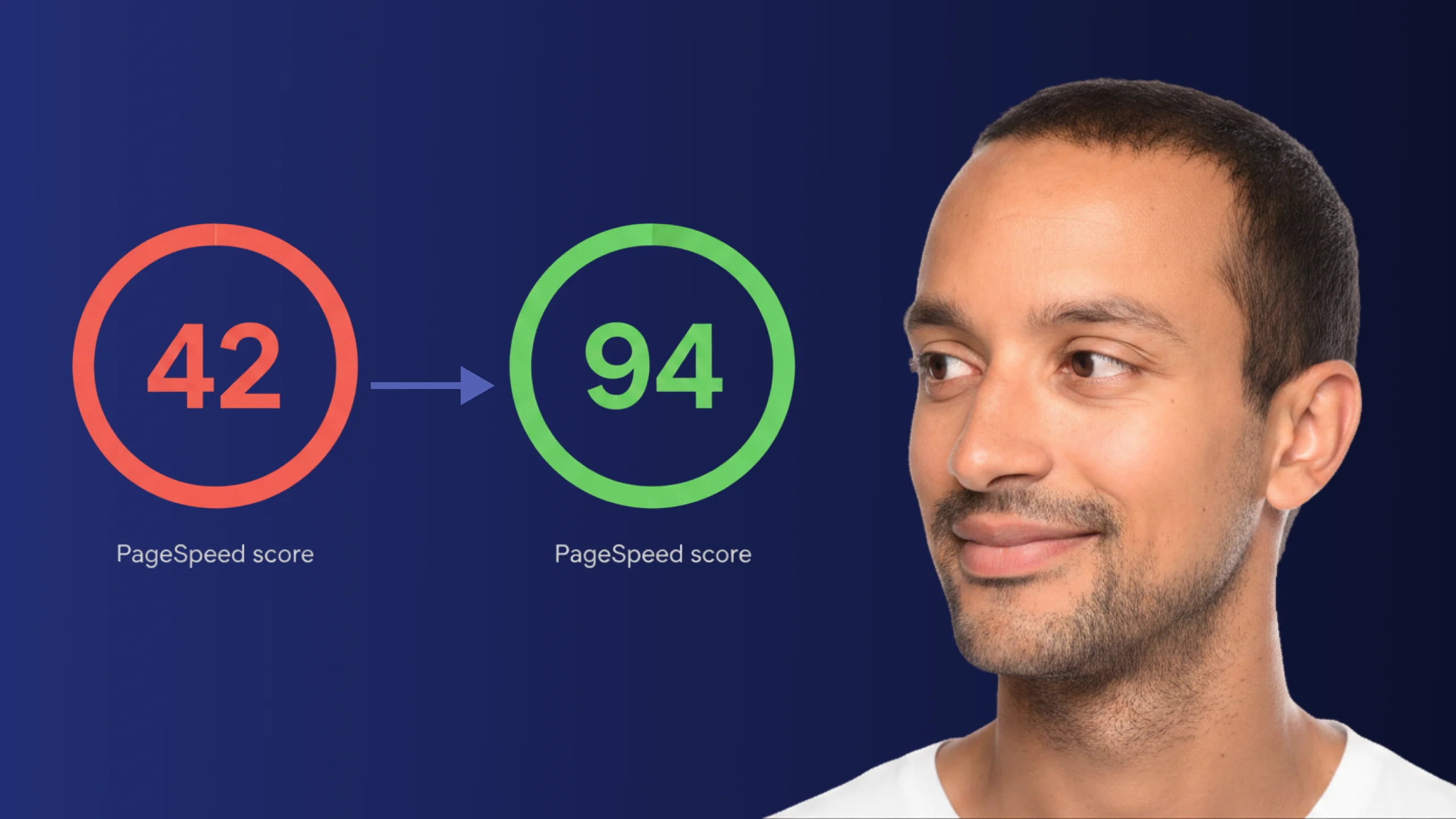
A PageSpeed score of 42 is not just slow - it is losing you real traffic on every visit. Here is exactly how Claude Code diagnosed and fixed the performance issues that moved this site from 42 to 94.
Read article