
How to Build a Design System With Claude Code
Your WordPress theme was enforcing design consistency invisibly. When you migrate to a custom Claude Code build, that disappears. Here is how to replace it with four files.
Read articleYour brand voice, sequence templates, and campaign context saved in files. Every email campaign builds on the last one.
Think about the last email sequence you built with AI.
You described your brand voice. You explained the campaign goal. You revised a few emails. The output was good.
Then you closed the chat. Next campaign, you start from zero again.
Email marketing is how businesses stay in contact with customers and leads through automated message sequences. Each sequence runs automatically when someone takes an action - signs up, buys something, goes quiet. Common types:
Building a sequence means writing the copy, defining the triggers, and setting the timing. Most of that work happens in a tool like Mailchimp, ActiveCampaign, or Loops.
Email is one of the highest-return channels a business can run. You own the list - no algorithm decides who sees your message. The cost does not go up every time you send. A well-built sequence keeps working for years. The problem is that building one well takes real time - and most businesses never invest that time properly because the writing alone is exhausting.
This is the pattern most marketers accept as normal. You get good output from AI, but nothing carries forward. Brand voice, sequence structure, tone rules - none of it transfers to the next session.
That is not a prompting problem. It is a structure problem.
Claude Code is an AI agent that runs in your computer’s terminal - the black window developers use to run programs. Unlike browser-based tools like ChatGPT, it reads and writes files directly on your computer. You give it instructions in plain English. It writes the email and saves it to a folder. The output stays there - no copying from chat windows, no reformatting, no starting over next session.
The difference between using AI for email and having an email system is one thing: files that persist.Your brand voice, your sequence templates, your past campaigns - all of it lives in your project folder. The next campaign starts from where the last one ended.
When you use a browser AI for email copy, the output lives in the chat. You can copy it, but nothing about that session informs the next one.
When you work with Claude Code, the output is a file. It lands in a folder in your project. You can build on it, reference it in the next session, and hand it to someone else without explaining the context.
This changes three things for email marketing:
Your brand voice stops disappearing. You write it once in a CLAUDE.md file. Claude Code reads it before every session. You never explain your tone, audience, or style again.
Your sequences build on each other. The welcome sequence is a file. The re-engagement sequence is a file. When you write a new campaign, Claude Code can reference the existing ones to stay consistent.
Your templates compound. Every good email you write becomes a template. Over time, your project has a library of formats that work - and Claude Code starts from those instead of starting from scratch.
Here is what a marketer working with Claude Code can produce in a single session:
SEQUENCES
SUPPORTING WORK
Claude Code writes these as files. You review them. You take them into Mailchimp, ActiveCampaign, ConvertKit, Loops, or wherever you work.
You need two things in your project folder: a CLAUDE.md file that describes your brand voice and email rules, and a folder where your sequences go.
A basic CLAUDE.md for email work looks like this:
## Brand Voice
Tone: direct, practical, warm - not cheerful
Audience: founders and operators who move fast and read email on their phone
Sentences: short, under 15 words where possible
Never use: "leverage", "synergy", "game-changing", "exciting"
CTA style: one per email, verb-first, tells the reader exactly what to do

## Email Formatting
Subject lines: under 50 characters, no clickbait
Preview text: always set, extends the subject line
Body length: under 200 words for nurture, under 400 for educational
Signature: Michael | Agent Builder Academy
That is it. Claude Code reads this at the start of every session and applies it without you re-explaining anything.
You can add to this file over time. Every rule you add compounds. After a few months, your project holds a complete email constitution that makes every sequence consistent.
A typical email marketing session with Claude Code takes 30 to 60 minutes for a complete sequence:
claude.Claude Code does not connect to your email platform. It does not send emails. It does not read your analytics directly.
It writes the content. You take that content into your email tool.
For the sending layer, two platforms work well with Claude Code output:
Both are designed to work with content you prepare separately - which is exactly what Claude Code produces.
If you want to close the loop entirely, n8n* is the workflow layer that connects the pieces. A new subscriber in your CRM triggers n8n, which routes them to the right sequence and fires the send through your platform. n8n is self-hosted and GDPR-compliant, which matters if you work with European contacts.
The full stack: Claude Code writes. n8n routes. Resend or Loops sends. Each tool does one job. None require a developer to set up.
Most marketers notice the biggest difference after three or four sessions.
The first session is mostly setup and one sequence. The second is faster because the context is already there. By the fourth, you are referencing past sequences, building on them, and producing consistent campaigns in a fraction of the previous time.
AI used once is a shortcut. AI used as a system is a force multiplier.The difference between the two is whether the context lives in the tool or in your project.
Partners and tools: Links marked are affiliate partnerships - we earn a small commission if you sign up, at no extra cost to you. Tools without (Resend, Loops) are mentioned because they are genuinely the right recommendation, partner or not. Both types meet the same standard: we only recommend what we would use ourselves.
One week free. If you want to try Claude Code before you commit, Anthropic offers a free week through referral. Start your free week here - no payment needed to begin.
This is part of the Build System - the layer that takes Claude from setup to real marketing output.
Next in this series: Claude Code for Content Repurposing
May you build Greatness! 🍀
Michael
Your WordPress theme was enforcing design consistency invisibly. When you migrate to a custom Claude Code build, that disappears. Here is how to replace it with four files.
Read article
Claude Code is not a developer tool. It is the tool that builds the marketing automations you keep describing in chat. No developer needed.
Read article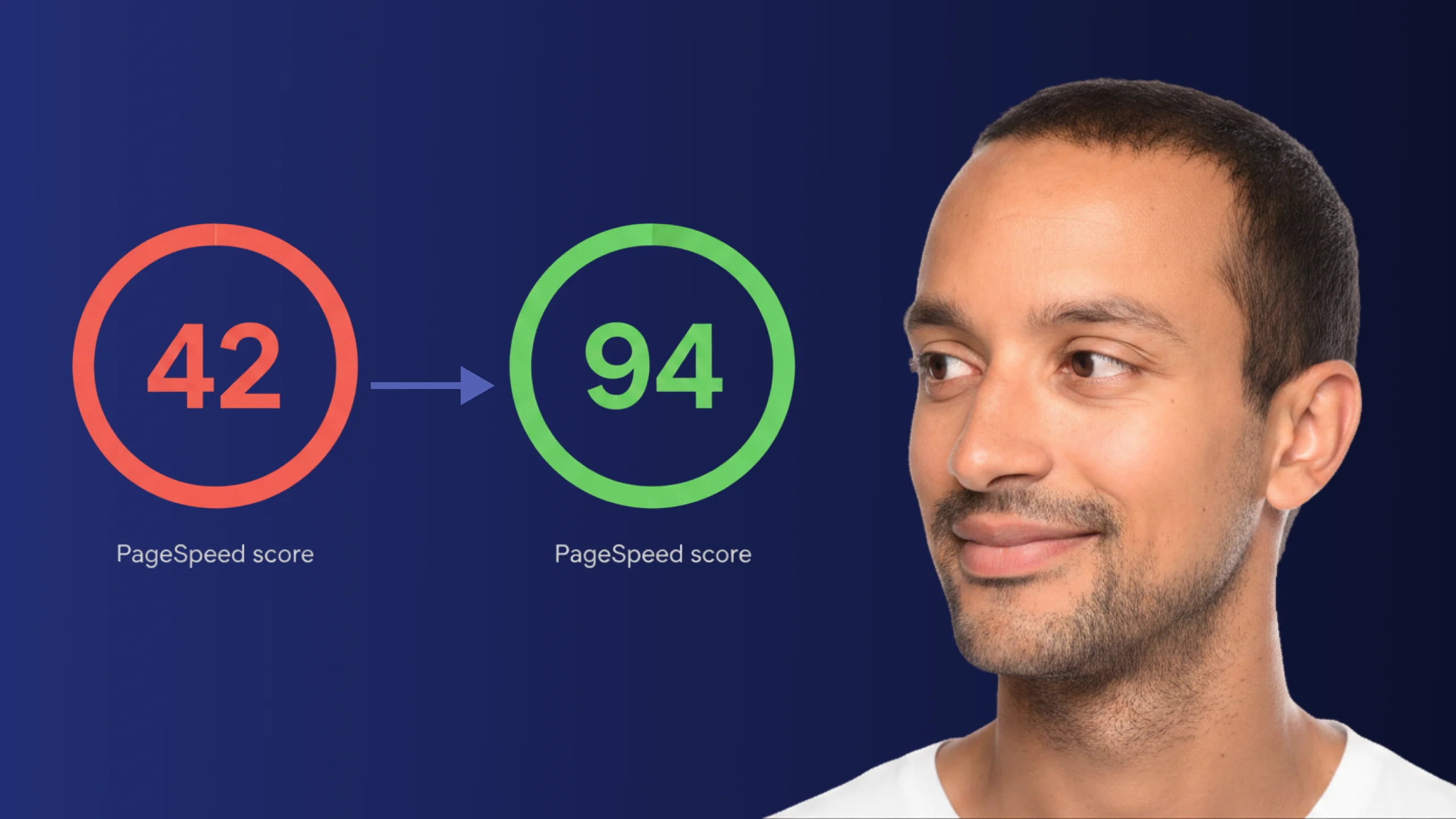
A PageSpeed score of 42 is not just slow - it is losing you real traffic on every visit. Here is exactly how Claude Code diagnosed and fixed the performance issues that moved this site from 42 to 94.
Read article