
How to Build a Design System With Claude Code
Your WordPress theme was enforcing design consistency invisibly. When you migrate to a custom Claude Code build, that disappears. Here is how to replace it with four files.
Read articleChatGPT and Claude Code look identical at the surface. The relationship underneath is completely different - and switching without understanding that difference is where most builders get stuck.
Nobody tells you that switching to Claude Code is going to feel strange. The assumption is that it is just a better version of what you already use - faster, smarter, same idea. So when the experience turns out to be genuinely different, there is no framework ready to explain why.
The answers are longer. The tool is doing more without being asked. Files are changing. The project is moving. And somewhere in the middle of that, a quiet unease appears - not because anything went wrong, but because something is clearly different, and the rules are not obvious anymore.
That unease is accurate. The rules are different.
ChatGPT and Claude Code share a surface that looks identical. You type a message. You receive a response. The interaction feels familiar.
But the relationship underneath is not the same at all.
When you use ChatGPT in a browser, you are talking to an assistant that has no access to your work. It cannot read your files. It does not know your codebase. Every conversation starts from zero. The assistant gives you information, suggestions, and drafts - and then you take that output and decide what to do with it. The human is always the one who acts. The assistant only advises.
Claude Code operates at a different level entirely. It runs in your terminal. It reads your project. It can open files, write to them, run commands, and make changes across your entire codebase in a single session. The context it holds is not a chat thread - it is your actual work environment.
This is the difference between an APL1 tool (a browser-based assistant with no system access) and an APL3 tool (a developer-level agent with codebase-wide reach). The interface looks similar. The underlying capability is not comparable.
At APL1, the relationship is clean and low-risk by design. You ask. The assistant answers. Nothing in your system changes unless you explicitly copy the output and apply it yourself.
Tools at this level
The assistant has no memory between sessions, no access to your files, and no ability to act on your behalf. This makes it safe and predictable. It also means the ceiling is low. You can get drafts, explanations, and suggestions - but every application requires a human in the loop.
What you can do: Ask anything. Copy what is useful. Ignore the rest.
What you cannot do: Ask it to update your codebase, run your tests, or remember what you worked on yesterday.
At APL2, the tool moves closer. In-editor assistants sit inside your development environment and can see the file you have open. They suggest completions, explain code, and help you write faster.
Tools at this level
This is closer to your work, but the access is still limited. The assistant sees what you show it. It does not browse your project autonomously. You remain in control of every change.
Claude Code changes the structure of this relationship fundamentally.
At APL3, the agent does not wait for you to show it something. It reads your project structure, opens relevant files, traces dependencies, and builds a working model of your codebase before it responds. When you ask it to fix a bug, it may open five files, identify the root cause, and apply a change across all of them in one step.
Tools at this level
This is where the inflection point - the AAL3 threshold where the agent stops suggesting and starts doing - becomes real in practice. The agent is no longer advising you. It is acting inside your system on your behalf.
The shift requires something from you that ChatGPT never did. It requires you to understand what you are authorizing, to review what changed and why, and to catch the cases where the agent did exactly what you asked but not quite what you meant.
The builders who struggle most with Claude Code are not the ones who find it technically difficult. They are the ones who bring APL1 habits to an APL3 tool.
At APL1, low review effort is appropriate. The assistant cannot touch anything. The worst outcome is a bad suggestion you ignore.
At APL3, low review effort is a risk. The agent can touch everything. A misunderstood instruction does not produce a bad suggestion - it produces a change in your codebase that may be correct in isolation and wrong in context.
Three habits matter most at this level.
Read what changed, not just what was asked. After every agent session, review the diff. The agent may have updated more than you expected - sometimes helpfully, sometimes not.
Write clear intent, not just clear tasks. At APL1, a vague prompt produces a vague answer. At APL3, a vague prompt produces a concrete change. The agent fills in the gaps with its own judgment. Tell it what you want to achieve, not just what you want it to do.
Know where the boundaries are. Claude Code can run commands, install packages, and modify configuration files. Understanding what it has access to in your specific setup is not optional - it is the foundation of working with it safely.
Once those three habits are in place, the next question is how deeply the agent is integrated into your project structure - not just your prompts. That progression has its own framework: the Agent Orchestration Layer (AOL).
There is no mode to switch off. There is no warning that appears when you cross the line between APL1 and APL3 behavior.
The transition happens when you first ask Claude Code to make a change without reviewing every line it touches. It happens the first time you run a command the agent suggested without reading what it does. It happens gradually, as the speed and capability of the tool make the review habits of the past feel unnecessary.
The builders who thrive at APL3 are not the ones who trust the agent more. They are the ones who understand it more clearly - and review it accordingly.The Claude Code guide for beginners covers what building at APL3 actually looks like from the first session - setup, first brief, and the review habits that matter from the start.
One week free. If you want to try Claude Code before you commit, Anthropic offers a free week through referral. Start your free week here - no payment needed to begin.
This is part of the Build System - the layer where setup becomes real output. The Claude Code Starter Guide is the next step: habits, structure, and the system that makes Claude Code work for non-engineers from session one.
May you build Greatness! 🍀
Michael
Your WordPress theme was enforcing design consistency invisibly. When you migrate to a custom Claude Code build, that disappears. Here is how to replace it with four files.
Read article
Claude Code is not a developer tool. It is the tool that builds the marketing automations you keep describing in chat. No developer needed.
Read article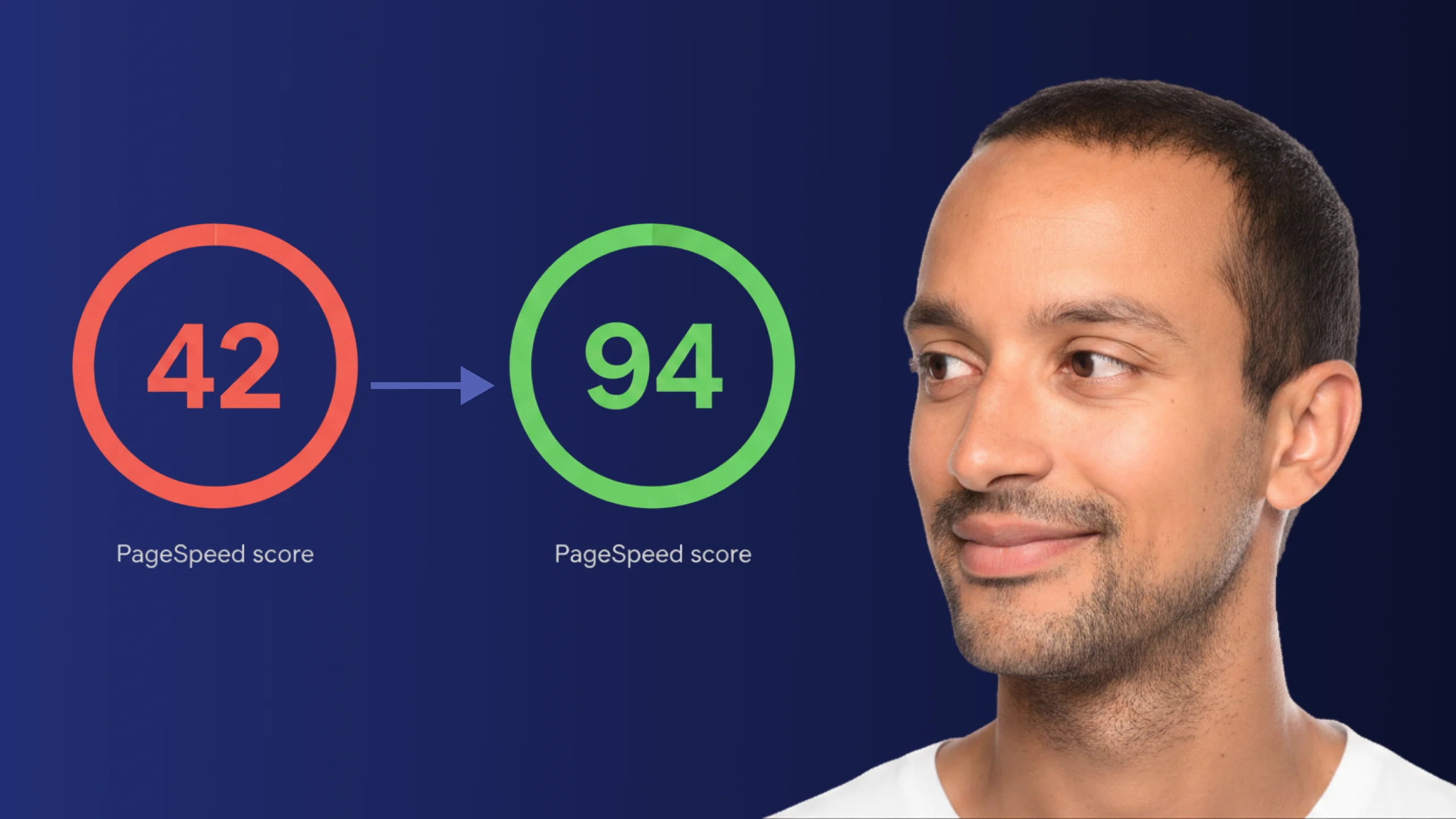
A PageSpeed score of 42 is not just slow - it is losing you real traffic on every visit. Here is exactly how Claude Code diagnosed and fixed the performance issues that moved this site from 42 to 94.
Read article